
I'm working with audio files recorded from an iPhone in m4a format. To open these in Audacity you need FFmpeg installed. This is currently a minor faff on macOS.
Step 1: Install the right FFmpeg version
I had 8.0 installed, but Audacity (as of version 3.7.5) needs 7. So it's:
brew install ffmpeg@7
Step 2: Locate the library
You might find that Audacity can now automatically locate FFmpeg, but I needed to manually locate the library:
$ fd -u libavformat.dylib /opt/homebrew
/opt/homebrew/lib/libavformat.dylib
/opt/homebrew/Cellar/ffmpeg/8.0_1/lib/libavformat.dylib
/opt/homebrew/Cellar/ffmpeg@7/7.1.2/lib/libavformat.dylib
It's the last one in that list, the library for version 7.
Step 3: Paste the library path into Audacity
Open Preferences, navigate to the Libraries tab, and "Locate..." the FFmpeg library:
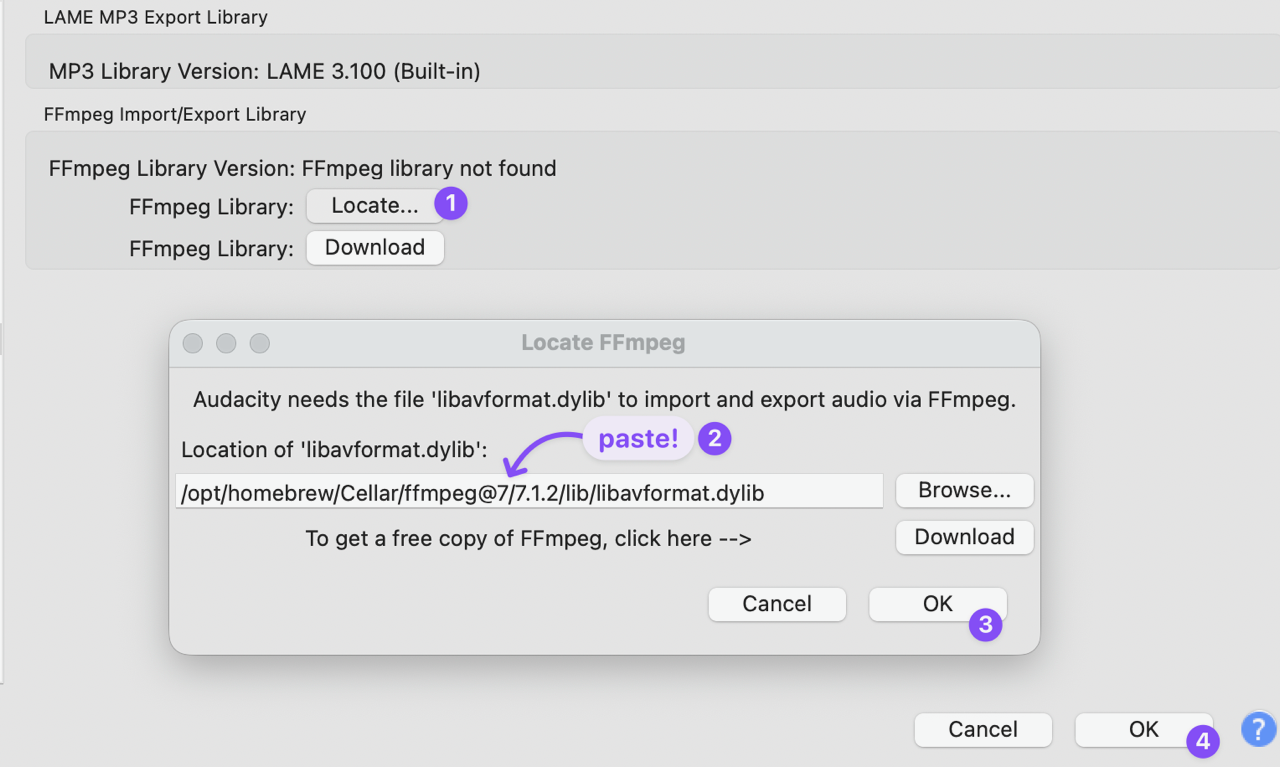
And that's it, you can now open MPEG-4 files.
* * *
I noticed the above updated ~/Library/Application Support/audacity/audacity.cfg, so perhaps that's easier:
[FFmpeg]
Enabled=1
FFmpegLibPath=/opt/homebrew/Cellar/ffmpeg@7/7.1.2/lib
* * *
If you're using headphones and can't hear anything, one possibility is that you connected the headphones after starting Audacity. Restart the tool, and check the Audio Setup drop down in the ribbon bar and select the right Playback device.