
I'm very happy blogging via Pika. It’s a lovely system.
If at some point I want to try something new, or if they change direction or my interests change, I don’t mind exporting and importing elsewhere. I’ve done it quite a few times now: from Blogger, Posterous, WordPress, Hugo, Pika (I might have missed a couple and messed up the order). Right now, I’m happy.
And yet. Gnawing away in the back of my mind is the fact that there are open source alternatives, which gives the possibility to tinker, adapt, and self-host. In principle, at least. And if my needs change, I could fork and go my own way, no hard feelings.
Pagecord could be that. It’s young, and in the same general style of Pika, with some nice distinctive features, and looks like it could very well do the job.
Could I run it? To start, I want to start it locally on a macOS machine, and have a poke around.
Update! Since writing this there's now a docker-compose file in the Pagecord git hub repository, so try the instructions in the README first.
Step 1: Install Ruby things
I have only the broadest of ideas what's going on here, not being a Ruby person, but this all worked:
brew install rbenv vips
git clone https://github.com/lylo/pagecord.git
cd pagecord
eval "$(rbenv init -)"
rbenv install
gem install rails
rbenv rehash
Step 2: Set up PostgreSQL and Redis
I used Docker compose for this, and I've posted the docker-compose.yml in a gist. With that in place, start a new terminal window and:
docker compose up
Back in the other terminal:
export DATABASE_URL=postgres://pagecord:password@127.0.0.1:5432/pagecord_dev
rails db:setup
Step 3: Run the app
bin/dev
...and open http://lvh.me:3000/
I'd not seen lvh.me before: it's a service that resolves subdomains to your localhost. Very handy. There are a few services like this.
On the app login in page, enter the subdomain joel and the email address of joel@pagecord.com. The window that appears will let you view the login link (top right: view plain text version):
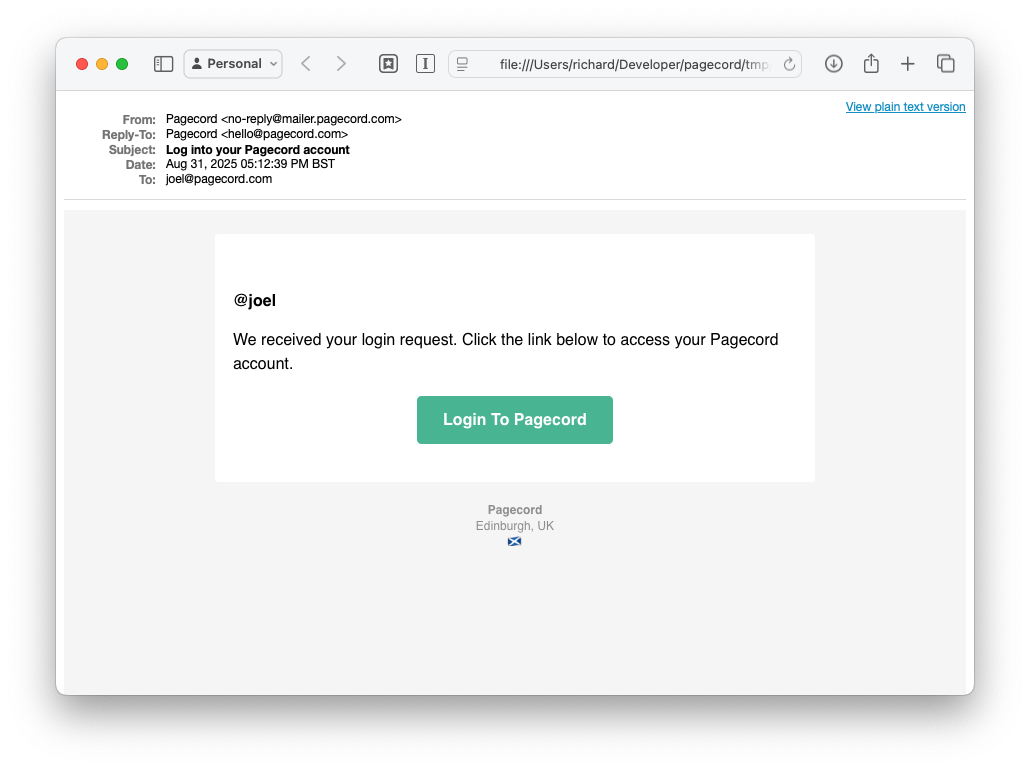
And from that point on you can do the basics: edit the blog, and view the posts. No incoming or outgoing email.
Conclusions
Yes, it's straightforward to get up and running locally. As a bonus that you get a peek at upcoming features. It's a very compelling blogging platform 🥰 that fits with the way I work.